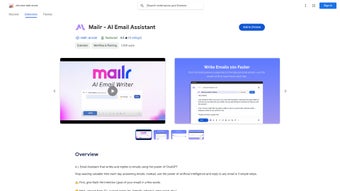

Download Mailr – AI‑Powered Email Assistant for Faster, Smarter Communication
Overview: Why Mailr Is Changing the Way We Write Emails
In today’s fast‑paced work environment, email remains the primary channel for professional and personal communication. Yet many of us spend countless minutes crafting the perfect reply, tweaking tone, or simply searching for the right words. Mailr steps in as an AI Email Assistant that leverages OpenAI’s GPT‑3 technology to transform a handful of keywords into a polished, context‑aware email. Whether you need a friendly thank‑you note, a persuasive sales pitch, or a concise status update, Mailr adapts to your intent and preferred style—friendly, informal, persuasive, or formal—ensuring each message sounds authentically yours.
Beyond speed, Mailr places privacy at the forefront. The platform guarantees that no email content is stored or shared with third parties, a critical assurance for businesses handling sensitive information. Currently, the extension works seamlessly with Gmail, and the development roadmap includes Outlook support, expanding its reach across major email ecosystems.
Mailr’s user‑friendly Chrome extension makes it accessible with a single click. After a quick account creation and authentication process, you can start typing a brief description of what you want to convey. The AI then generates a complete draft, which you can edit, approve, or send directly. This workflow reduces the mental load of email composition, freeing up time for higher‑value tasks. In short, Mailr is not just a tool—it’s a productivity partner that helps you communicate more effectively while keeping your data secure.
Key Features That Set Mailr Apart
- AI‑Generated Drafts in Seconds: Input a short prompt, and Mailr produces a full‑length email ready for review.
- Tone Customization: Choose from friendly, informal, persuasive, formal, or custom tones to match the recipient and context.
- One‑Click Chrome Extension: Access the assistant directly from your Gmail interface without leaving your inbox.
- Privacy‑First Architecture: No email content is stored on Mailr servers; all processing occurs securely and is discarded after generation.
- Multi‑Language Support (Beta): Drafts are available in English, Spanish, French, and German, expanding global usability.
- Smart Reply Suggestions: When you receive an email, Mailr can propose quick reply options based on the message’s tone and intent.
- Future Outlook Integration: Planned support for Microsoft Outlook ensures cross‑platform flexibility.
- Continuous Learning: The AI refines its suggestions over time, adapting to your personal writing style.
These features collectively create a comprehensive email‑writing ecosystem that addresses speed, quality, and security. By integrating directly into the browser, Mailr eliminates the need for separate drafting windows or copy‑pasting, streamlining the entire communication loop.
Installation, Usage, and Compatibility Guide
Step‑by‑Step Installation
Getting Mailr up and running is straightforward. First, visit the Chrome Web Store and search for “Mailr – AI Email Assistant.” Click “Add to Chrome,” and the extension icon will appear next to your address bar. Upon the first launch, you’ll be prompted to create a Mailr account using an email address and a secure password. After confirming your account via the verification email, sign in within the extension popup. The authentication process uses OAuth to connect securely with your Gmail account, ensuring that Mailr can read subject lines for context while never storing the actual email body.
How to Use Mailr Effectively
Once installed, compose a new email or open a reply thread in Gmail. Click the Mailr icon to open the assistant pane. In the text field, type a brief description of your goal—for example, “Schedule a meeting next week to discuss Q4 budget.” Below the description, select the desired tone from the dropdown menu.
Press “Generate,” and within seconds, Mailr will display a fully‑formed email draft. You can edit the draft directly in the pane, copy it into your email, or hit “Insert” to place it automatically. The same workflow works for incoming messages: open the email, click the Mailr icon, and choose “Smart Reply” to see suggested responses.
Operating System and Browser Compatibility
Mailr is built as a Chrome extension, making it compatible with any operating system that supports Google Chrome, including Windows 10/11, macOS Catalina and later, Linux distributions, and Chrome OS. Because the extension runs client‑side, performance depends on your device’s RAM and CPU, but most modern machines handle the AI calls without lag. Future updates will introduce native desktop apps for Windows and macOS, as well as mobile support via Chrome on Android and iOS.
Overall, the installation process takes under five minutes, and the usage flow is designed for minimal friction, allowing users to focus on the conversation rather than the tool.
Pros, Cons, and Frequently Asked Questions
Pros and Cons
- Pros:
- Speeds up email composition dramatically.
- Customizable tone ensures messages feel authentic.
- Strong privacy guarantees—no data retention.
- Integrated directly into Gmail, eliminating context switching.
- Supports multiple languages and plans for Outlook expansion.
- Cons:
- Limited to Chrome browser (no native app yet).
- Current free tier caps the number of AI generations per day.
- Advanced formatting (tables, complex HTML) may need manual tweaking.
- Outlook support is pending, which could limit adoption in some enterprises.
FAQ – Answers to Common Queries
Is Mailr really free to use?
Mailr offers a free tier that includes up to 50 AI‑generated emails per month. For heavy users, a paid subscription unlocks unlimited generations, priority processing, and advanced tone presets.
How does Mailr protect my privacy?
All content is processed in memory and discarded immediately after the draft is generated. Mailr never stores email bodies or personal data on its servers, and all API calls are encrypted via TLS.
Can I use Mailr with Outlook now?
Outlook integration is slated for release in Q2 2025. Until then, you can use the web version of Outlook with the Chrome extension, but full native support is not yet available.
What languages does Mailr support?
Mailr currently supports English, Spanish, French, and German in its beta language pack. Additional languages are being added based on user demand.
Do I need an internet connection to generate emails?
Yes. The AI generation relies on cloud‑based GPT‑3 models, so a stable internet connection is required for each draft request.
Conclusion: Should You Download Mailr Today?
Mailr stands out as a robust AI‑driven solution that tackles one of the most time‑consuming aspects of modern work—email composition. By offering instant drafts, tone customization, and a privacy‑first approach, it delivers tangible productivity gains without sacrificing security. The Chrome extension’s seamless integration means you can start benefiting from AI assistance within minutes of installation.
If you frequently write professional emails, manage client communications, or simply want to reduce the mental overhead of crafting messages, Mailr is a worthwhile addition to your toolkit. The free tier provides ample opportunity to test its capabilities, while the premium plan unlocks unlimited usage for power users.
Ready to experience faster, smarter email writing? Download Mailr now and let the AI handle the drafting while you focus on what truly matters—building relationships and getting things done.






